Terminal Agents
A terminal agent is a command-line program that runs the agent loop of Chapter 1 in your repository, with your shell's reach. It reads files, edits them and runs commands, asking first according to its permission mode. As of October 2026 a handful of them account for most use, each made by a company that also sells the models behind it, alongside open-source agents that can work with models from several providers.
This page is the first of three that name products, and it is out of date by design: it was checked against each vendor's own documentation in October 2026 and is rewritten every month. The four main tools each get the same six fields in the same order. The rest of the book is what you do with any of them.
The Category and the Table
Every terminal agent shares four things: the loop, an instructions file it reads at the start of a session, a permission mode that decides what runs without asking, and a way to run your tests. The differences, as of October 2026, are in the details of those four, and the table puts them side by side. Where this month's check could not confirm a detail from the vendor's documentation, the page says so rather than guessing.
| Tool | Instructions file | Permission settings | Command sandbox |
|---|---|---|---|
| Claude Code | CLAUDE.md; AGENTS.md if no CLAUDE.md | six modes; allow, ask and deny rules | optional, off by default |
| Codex CLI | AGENTS.md | approval policy, separate from sandbox | three sandbox modes |
| Copilot CLI | copilot-instructions.md, AGENTS.md, CLAUDE.md, GEMINI.md | per-tool prompts; allow and deny flags | optional, switched on in a session |
| Antigravity CLI | GEMINI.md, AGENTS.md | modes; allow, ask and deny lists | optional, off by default |
| Kiro CLI | steering files in .kiro/steering, AGENTS.md | allow, ask and deny rules | optional, off by default |
| OpenCode | AGENTS.md; CLAUDE.md if none | allow, ask and deny rules; most allow by default | none in its documentation |
| Tool | Maker | Open source | Billing unit |
|---|---|---|---|
| Claude Code | Anthropic | No | plan limits, or API tokens |
| Codex CLI | OpenAI | Yes, Apache-2.0 | plan limits and credits, or API tokens |
| Copilot CLI | GitHub | No | AI credits, by tokens |
| Antigravity CLI | No | Google AI plan | |
| Kiro CLI | Amazon | No | credits on Kiro plans |
| OpenCode | Anomaly | Yes, MIT | the model provider's own |
Claude Code
- What it is. Anthropic's terminal agent, also available as extensions for two editor families, as a desktop app, and as cloud sessions, which the third page of this chapter covers.
- Setup. A native installer script, or Homebrew, WinGet and the main Linux package managers. It needs a paid individual or team plan or a developer account billed by usage; the free plan does not include it, as of October 2026.
- Instructions file.
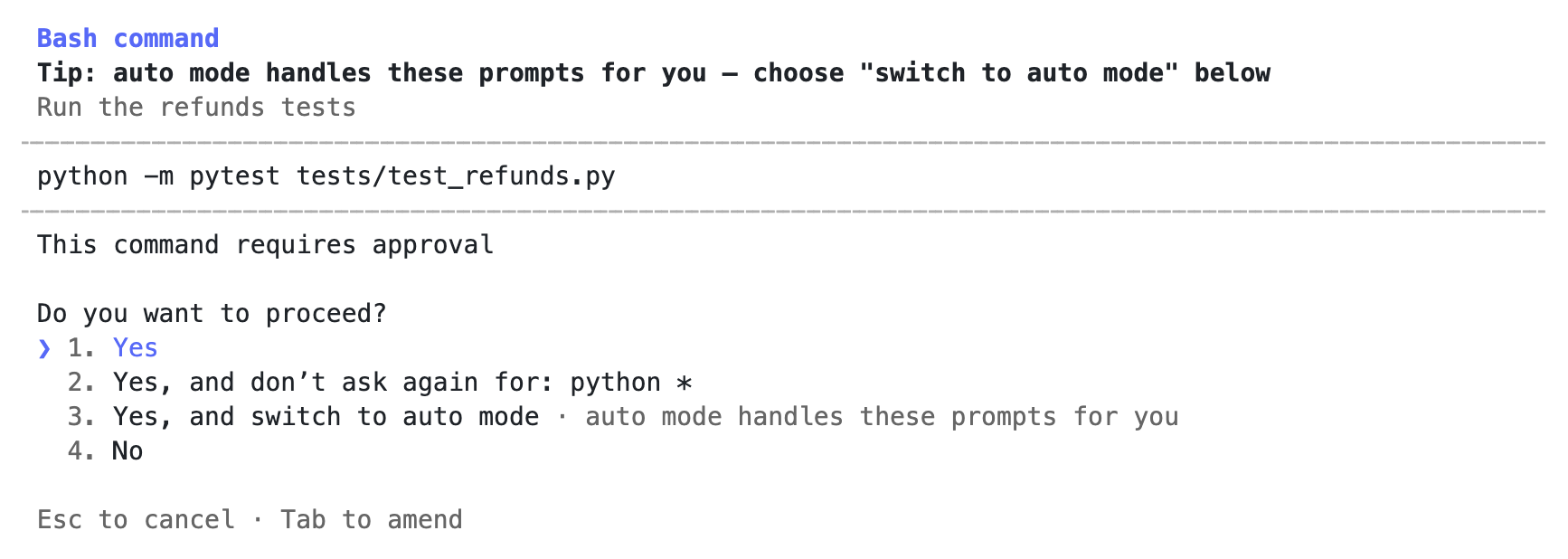
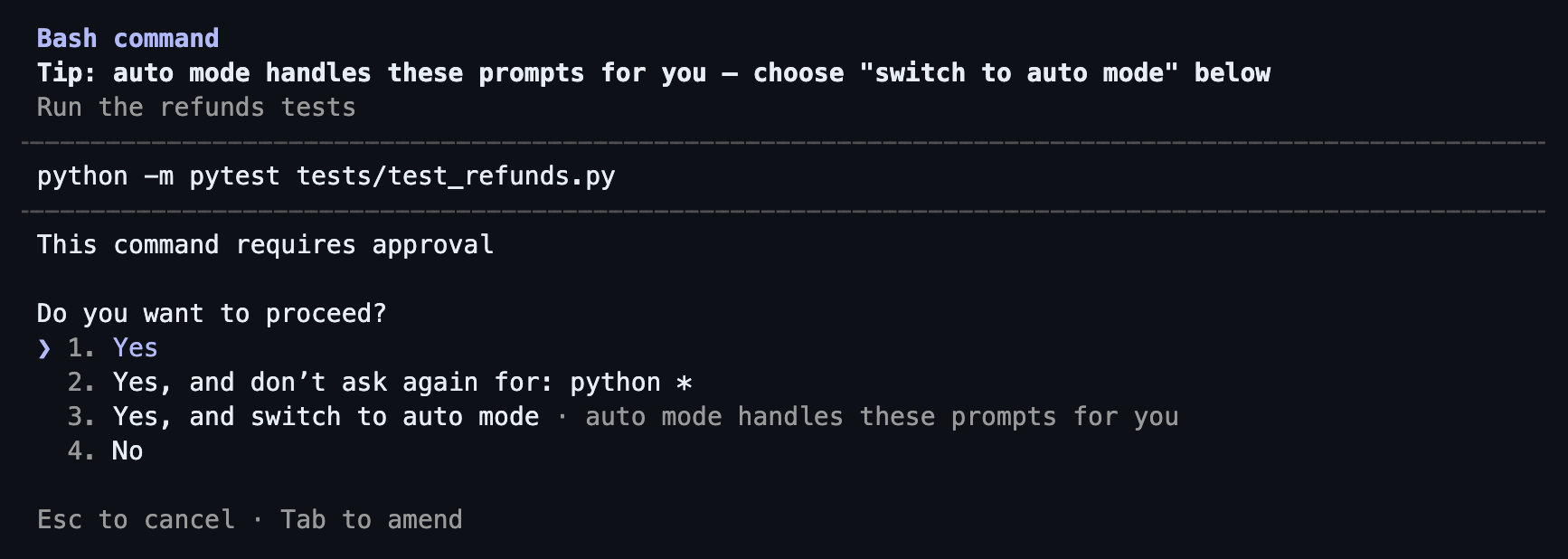
CLAUDE.mdat the repository root, plus a personal file in your home directory and an uncommitted local one. Since version 2.1.277 it readsAGENTS.mdinstead when the repository has noCLAUDE.md, and aCLAUDE.mdcan import another file, which is how one source file serves several tools. - Permissions and sandbox. Six modes: Manual, Accept edits, Plan, Auto, Don't ask, and Bypass permissions. As of October 2026 a new terminal session starts in Auto, where a background classifier rather than you reviews commands before they run, so check the mode on first use. In Manual mode a command that no rule allows waits on the question "Do you want to proceed?"; the answers include Yes, No, and a "don't ask again" choice that saves the allow rule it names, which can cover far more than the command in front of you. Allow, ask and deny rules live in a settings file you can commit for the whole team. An optional sandbox, off by default, runs shell commands inside an operating-system boundary with network access limited to domains you allow.
- Billing. Usage limits on the subscription plans, or per-token billing on a developer account. Under terms announced in 2025, users of the individual plans choose whether their sessions may be used for training, while team plans and the developer interface fall under separate commercial terms.
- Maps to. The instructions file of Chapter 3, the approval modes and the sandbox of the same chapter, and the cost meters of Chapter 14.
Codex CLI
- What it is. OpenAI's terminal agent, open source under the Apache 2.0 licence, part of a family with an editor extension, a desktop app and a cloud agent.
- Setup. An install script, npm or Homebrew. Sign in with a ChatGPT account, whose plans from Free to Enterprise include it as of October 2026, or with a developer key billed by usage.
- Instructions file.
AGENTS.md. The convention is now stewarded by the Agentic AI Foundation under the Linux Foundation, to which OpenAI contributed it in December 2025, and most tools on this page read it. - Permissions and sandbox. Two separate settings. A sandbox mode, read-only, workspace-write or full access, enforced by the operating system. And an approval policy, such as on-request or never, that decides when it asks. This makes the two decisions of Chapter 3, what may run unasked and what a command can reach, visibly separate. Workspace-write with on-request is the documented low-risk preset for local work.
- Billing. On ChatGPT plans, usage limits that reset over a five-hour window on most paid plans, weekly limits that may apply on top, and paid credits once the included usage runs out. With a developer key, usage is billed at the interface's token prices.
- Maps to. Chapter 3's instructions file, approval modes and sandbox, which this tool exposes as separate settings.
Copilot CLI
- What it is. The terminal member of GitHub's Copilot family, which also has the editor assistant on the next page and the cloud agent on the page after it.
- Setup. npm, WinGet, Homebrew or an install script, with an active Copilot subscription. Sign in from inside the tool, or with a fine-grained access token that has the Copilot permission.
- Instructions file. The repository-wide
.github/copilot-instructions.md, path-specific instruction files, and the agent files of other tools:AGENTS.md,CLAUDE.mdandGEMINI.md. As of October 2026 it reads more conventions than any other tool on this page. - Permissions and sandbox. It works only in directories you confirm as trusted, and asks before each tool runs: once, for the rest of the session, or no with a correction. Command-line flags allow or deny specific tools, and a deny always beats an allow. One flag allows every tool without asking, which is the bypass mode of Chapter 3 under another name. An optional local sandbox, switched on from inside a session, limits its access to files, the network and the system.
- Billing. Since 1 June 2026, Copilot plans are billed in AI credits consumed by the tokens processed, at rates that vary by model, with a monthly amount included in each plan. Annual plans bought before the change keep the older per-request billing until they end.
- Maps to. The instructions file and approval modes of Chapter 3, and the token meter of Chapter 14.
Antigravity CLI
- What it is. Google's terminal agent, and since 18 June 2026 the one for individual accounts. On that day Gemini CLI stopped serving consumers on Google's paid AI plans and free individual users, who were moved to Antigravity CLI. Gemini CLI remains for customers on business licences and for paid developer keys.
- Setup. A separate program, run as
agy. On first run it detects an existing Gemini CLI configuration and offers to carry it over. - Instructions file.
GEMINI.mdandAGENTS.mdin the working directory, plus a personalGEMINI.mdin your home directory. - Permissions and sandbox. Execution modes such as auto and accept-edits, and allow, ask and deny lists in a settings file, with a deny always winning. A terminal sandbox, off by default, confines commands to the workspace with no network unless you allow it. Which mode a new session starts in was not confirmed, so check it before the first task, and assume nothing from Gemini CLI's defaults.
- Billing. Quotas from the Google account's plan: without a paid plan, a smaller quota refreshed weekly; on the paid plans, larger quotas refreshed every five hours up to a weekly limit, with credits for usage beyond them.
- Maps to. The instructions file of Chapter 3, and this chapter's reason to exist: in one month a widely used tool was replaced, for most of its users, by a new program with a different name. Every script and policy that named it needed an edit.
Other Terminal Agents
Kiro CLI is Amazon's terminal agent, the former Amazon Q Developer CLI, renamed in November 2025. It reads steering files from a .kiro/steering directory in the project, and AGENTS.md too, and still reads the .amazonq folder the old tool left in a project, though .kiro wins when both exist. Permissions are allow, ask and deny rules, with a deny always winning, and a command sandbox is available, off by default. It is billed in credits on Kiro's plans, a free one included, with paid plans able to buy more.
OpenCode is an open-source terminal agent under the MIT licence, made by a company called Anomaly and actively maintained as of October 2026. Most of its permissions default to allow, with deny rules always enforced, so read its permission settings before the first task. The field to stress for every open-source agent is the one people misread: the agent's code being open says nothing about where the model runs. Point it at a hosted model and your context leaves the machine exactly as it does with any commercial tool, under that model provider's terms, which is the mechanism of Chapter 12. Running a model locally is possible and keeps the context at home, at the cost of speed and quality.
- "The instructions file is called the same thing everywhere." The cross-vendor
AGENTS.mdis widely read as of 2026, and several tools still read their own file first. One source file that the others import or point to is what keeps them from drifting apart. - "An open-source agent keeps my code on my machine." The agent's code is open; the model it calls is usually hosted, and the context goes wherever the model is.
- "The subscription covers unlimited agent use." Subscriptions carry usage limits or credit meters, and a long autonomous run can use a day's allowance in an hour.
- "The default permission mode is the safe one." Defaults differ between tools and between versions of the same tool; one of them starts new sessions in a classifier-reviewed mode as of October 2026. Check the mode on first run.
- "Choosing a terminal agent is a long-term commitment." The habits and the repository's instructions, commands and tests carry over. Switching costs an afternoon, as the fourth page of this chapter shows.
- Read the permission mode and sandbox setting on first run, before the first task. Defaults are the vendor's choice, not yours.
- Keep one source instructions file and make the tool-specific files point to it. Two copies drift within a month.
- Find out the billing unit and the limit before a long run. A token meter and a request meter punish different habits.
- Record the tool and version in the team policy's approved list with the month you checked it. This page is out of date by design.
Knowledge Check
One tool has a sandbox mode setting and a separate approval policy setting. Which corresponds to which decision from Chapter 3?
- Approval policy is when it asks; sandbox mode is what a command can reach
- Sandbox mode is when it asks; approval policy is what a command can reach
- Both are the same decision, so setting one of them is enough for safety
- Both are instructions to the model, which it follows when it chooses to
A colleague says an open-source terminal agent is safe for client code because "the code is open, so nothing leaves the machine". What is wrong?
- Open-source agents upload the whole repository on their first run
- The model it calls is usually hosted, so the context leaves anyway
- Its open-source licence gives the maintainers rights to your client code
- Open-source agents cannot run with local models, only hosted ones
An autonomous run of three hours is planned on a plan billed by tokens. What should you expect compared with a plan billed per request?
- The same cost, because both meters count the same underlying work
- Lower cost on tokens, because a long run sends only a few prompts
- Higher cost on tokens, since every turn re-sends a growing context
- No cost on either, since autonomous runs are outside plan limits
What should a team keep independent of any one tool so that switching is cheap?
- The tool's own settings files, copied unchanged into every other tool
- One instructions file, the commands and the tests, kept in the repository
- A list of each model's quirks, so the next tool can be configured the same
- The session history, exported so the next tool can resume the same work
A team's scripts and policy name a terminal agent that its vendor replaces with a new program, under a new name and plan eligibility. What does this show?
- The team's instructions file needs rewriting for the new tool's model
- The team should never have chosen a tool from that particular vendor
- Pinning the tool's version would have kept the old name working
- Tool names belong in scripts and policy only with a date and an owner
You got correct